What does this actually mean for the average person trying to, say, upload a passport photo for some bureaucratic nonsense? It means you might actually be able to do it without feeling like you’re selling your digital soul. For millions of Indians wrestling with competitive exam applications – NEET, UPSC, SSC, you name it – the process is a perennial headache. “Upload passport photo: Must be exactly 3.5cm x 4.5cm, under 50KB, with a white background, and saved at a specific DPI/resolution.” Sound familiar? Yeah, it’s a special kind of digital torture.
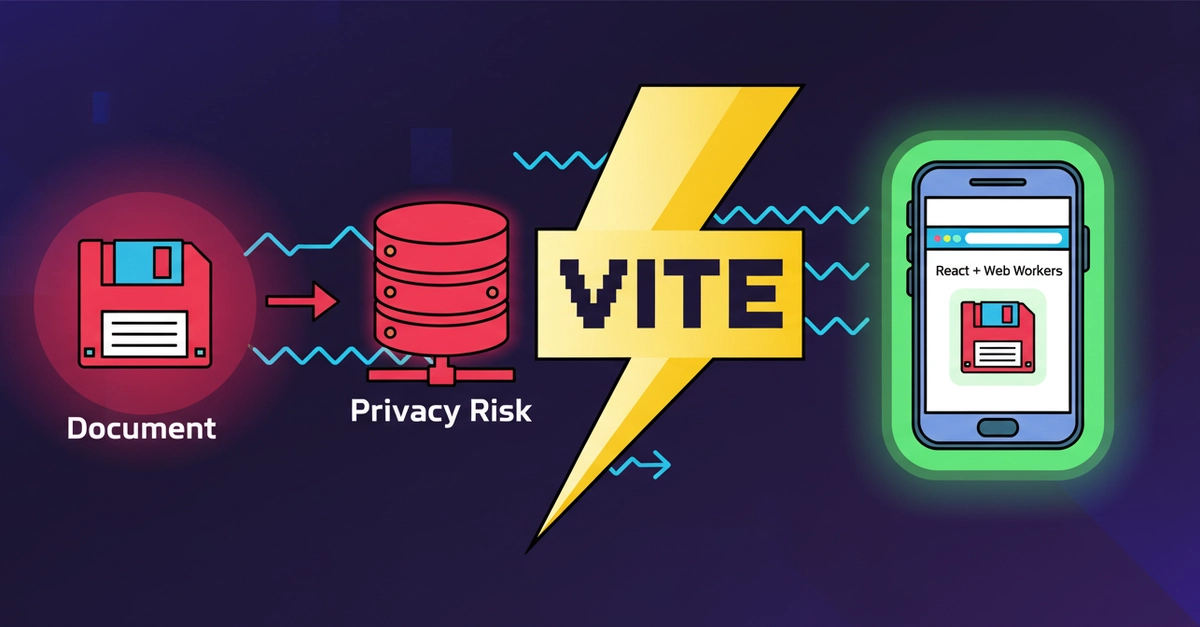
And here’s where it gets ugly: most of those “free” online resizers you find are just data collection farms. You upload your sensitive personal data—Aadhaar, PAN, passport scans—and poof, it’s sitting on some remote server, ripe for the picking. Identity theft, tracking cookies, database leaks… the whole nine yards. This is the reality most people face, and it’s frankly appalling.
No Server, No Problem, No Cash
So, a student in Gujarat, fed up with this mess, built PasteDocs. The core pitch is simple: absolute privacy, zero server costs. They’ve engineered a suite of tools using React, Vite, TypeScript, and those handy Web Workers to perform all resizing, compression, and format conversions entirely within your browser’s sandbox. That means your sensitive documents never, ever leave your device. This isn’t just some minor improvement; it’s a fundamental architectural shift designed to put control back in the user’s hands.
For twenty years I’ve watched Silicon Valley chase the next big thing, usually driven by who’s got the biggest cloud bill and the most venture capital. This is the antithesis of that. This is about building something useful, addressing a real pain point, and doing it with a ridiculously lean operation. The author proudly states the system costs precisely $0 in server bills. That’s not a typo. In an era where companies are bleeding cash on infrastructure, this is a breath of fresh air.
Instead of paying for expensive backend GPU cores or cloud databases to process images via Node.js or Python, PasteDocs shifts the entire computing workload directly onto the user’s client-side device CPU using standard web assembly and browser canvas layers.
Think about that. They’re not just saying it’s free; they’re showing how it’s free by being brutally efficient. No cloud databases, no fancy backend servers. It’s all happening right there on your machine. This is the kind of ingenuity that used to define the early web, before everything became a sprawling, opaque enterprise service.
Offloading the Grunt Work
But here’s the catch with doing everything locally: it can be a performance killer. Trying to resize a high-res photo or compress a massive PDF on your main browser thread? You’ll end up with a frozen browser and a furious user. That’s where those background Web Workers come in. The engineering here is pretty clever: instead of bogging down your primary interface, the heavy lifting—the recursive scaling math, the pixel rendering, the image encoding loops—gets shunted off to a separate thread. This keeps your browser zippy, even on those ancient Android phones struggling in the boondocks. They’re even boasting 60fps performance on low-end devices. That’s not just good; that’s impressive.
It’s all about making sure that even when you’re hitting those strict file size limits, like “Compress to 50KB” or “20KB,” the process is smooth and responsive. The provided code snippet shows a do...while loop modulating rendering quality. It’s a pretty standard recursive compression technique, but executing it client-side without hitting a server is the real trick.
Who’s Actually Making Money Here?
This is the question I always ask. The author explicitly states PasteDocs is their own project, built as an indie software builder. The technology stack—React, Vite, TypeScript, Zustand, Web Workers—is all standard, open-source fare. Vercel is mentioned as the deployment platform, which typically has a generous free tier for projects like this. So, who’s getting rich? Right now, it doesn’t look like anyone is. And that, frankly, is its superpower. When you remove the profit motive from the core functionality, you often end up with something genuinely user-centric. The goal here is clearly not to monetize user data or sell subscriptions. It’s to solve a problem.
My unique insight here? This isn’t just about document resizing. It’s a microcosm of the larger trend of client-side computing gaining traction. As web technologies mature and browser APIs become more powerful, we’re seeing a resurgence of applications that can do heavy lifting without needing massive server farms. This could fundamentally change the economics of software development, especially for small teams and individual developers. Imagine more sophisticated applications—video editors, image manipulation tools, even basic CAD software—running entirely in the browser. The infrastructure costs for developers plummet, and privacy for users is baked in from the start.
The Human Element: Why It Matters
Look, the tech specs are interesting, sure. But the real story here is about reclaiming a sliver of digital dignity. Every time someone is forced to upload their most personal documents to a dubious online service, a little bit of trust erodes. PasteDocs, by virtue of its radical client-side design, rebuilds that trust. It’s a quiet rebellion against the pervasive data-guzzling economy of the internet. It’s a reminder that useful tools don’t have to come with a hidden cost or a privacy compromise. They just have to work, and work well, without betraying the user.
It’s built with React, Zustand, and background Web Workers for auto-resizing government application documents locally. It’s a privacy-first, zero-friction document utility. And crucially, it costs exactly $0 in server bills.
🧬 Related Insights
- Read more: AI Runs on Your Phone: The Cloud Becomes Optional [Gemma 4]
- Read more: Cursor Pagination: The 2026 Database Savior?
Frequently Asked Questions
What does PasteDocs actually do?
PasteDocs is a free, web-based tool that allows users to resize, compress, and convert document images (like photos and signatures) to meet the specific requirements of government application forms. All processing happens locally on the user’s device, ensuring absolute privacy.
Will PasteDocs replace my photo editing software?
No, PasteDocs is designed for specific, high-volume tasks related to government and competitive exam applications. It’s not a general-purpose photo editor but excels at quickly formatting images to precise dimensions and file size constraints required by official forms.
Is this really completely free and private?
Yes, the tool is engineered to run entirely client-side within your browser, meaning no personal documents are uploaded to or stored on any server. The author confirms it incurs zero server costs, making it free for users.